7.4. Directory layout
Everything lives in the checkout — ~/spear in the examples; the tree can
sit anywhere. It mixes three quite different
kinds of content — application code, multi-gigabyte model weights, and
persistent state — so it is worth knowing which is which before running a
find over it.
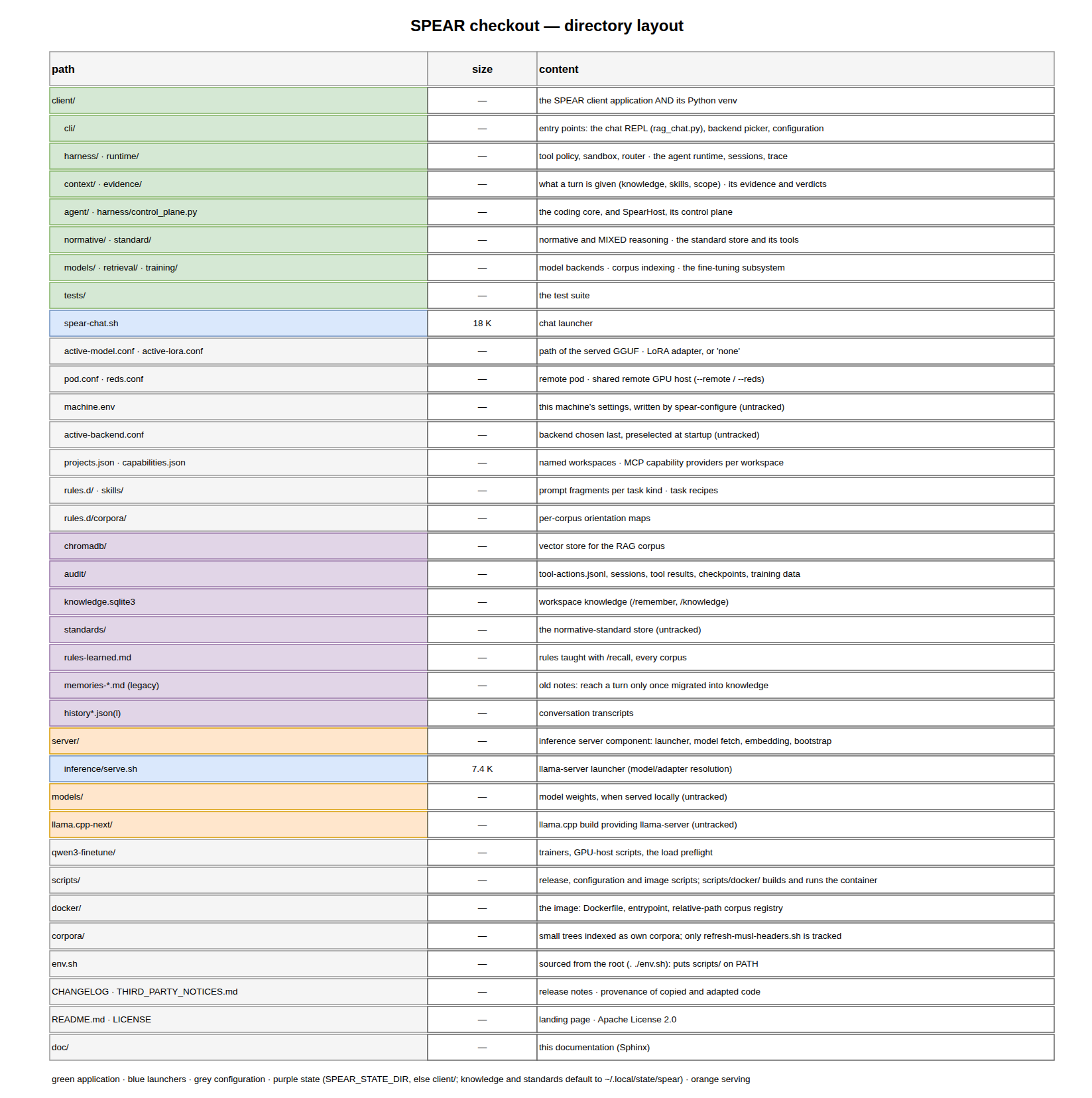
Fig. 7.2 The checkout at a glance: application, models, state.
7.4.1. Top level
Path |
Content |
|---|---|
|
The application and its Python virtualenv. |
|
The generic inference server component: the |
|
Release, configuration and image scripts ( |
|
The container image: |
|
Model weights, when a model is served locally. Not tracked. |
|
The |
|
The fine-tuning working area: LoRA trainers, GPU-host scripts, corpus builders and the load preflight. The governed training path lives in the application instead (Training and fine-tuning). |
|
Small trees indexed as their own corpora ( |
|
|
|
This documentation. |
Note
spear being both the application directory and the virtualenv root
is why bin/, lib/ and include/ sit next to the packages.
It is unusual but deliberate: the app and its exact dependency set travel
together.
7.4.2. The application
The code is one package per concern, imported from client/ as their common
root (from evidence import completion). rag_chat and the other
commands are run as files (client/bin/python client/cli/rag_chat.py); the
launchers and the image do that for you.
Package |
Role |
|---|---|
|
The commands. The chat client’s entry point is |
|
The coding core: its loop, tool dispatch, tools and prompt. It imports
nothing of SPEAR and talks to a |
|
The execution harness: |
|
The provider-neutral model/tool loop of the normative and general
runtime ( |
|
The evidence plane: canonical evidence, source epochs and the
implementation verdict ( |
|
What a turn is given: deterministic context selection, the workspace
context, workspace knowledge ( |
|
The MIXED pipeline ( |
|
The normative store: ingestion, structure, semantic records, retrieval, review and the standard’s tools. |
|
Provider-neutral model turns ( |
|
Embedding and corpus ingestion into Chroma ( |
|
The fine-tuning subsystem: capture, curation, governance, readiness,
frozen bundles and the operator control plane, none of it
model-visible (Training and fine-tuning); |
|
The test suite; see Testing. |
|
Evaluation harnesses and the benchmark runner. |
7.4.3. Configuration
File |
Meaning |
|---|---|
|
Absolute path of the GGUF to serve, read by |
|
LoRA adapter path, or the literal |
|
Connection details for the remote vLLM pod used by
|
|
Host, port and model of a shared GPU server used by
|
|
Settings specific to THIS machine, untracked: the |
|
The backend chosen last, preselected by the startup picker. Runtime state, not versioned. |
|
Named workspaces the chat can open, mapping a short name to an absolute path and a project kind. |
|
External capability providers registered per workspace (MCP servers
over stdio). |
|
The tool usage guide handed to the model. |
|
Prompt fragments injected per task kind. |
|
Task recipes (build debugging, rootfs packages, code quality…), each
optionally opening with a |
7.4.4. Content the deployment owns
rules.d/, skills/ and benches/ are content, not code — and a
deployment’s own rules, its learned skills and the bench that rates it are
exactly the material that does not belong in a public tree. Each therefore
answers to an environment variable:
Variable |
Default |
What it holds |
|---|---|---|
|
|
the always-injected rules, and |
|
|
the skill library, read and written — |
|
|
the acceptance benches a project declares by bare name |
The default is the in-tree directory, so a plain checkout behaves exactly as it did; no default points outside the checkout, which is what keeps a private path out of public source. An empty value counts as unset rather than naming the filesystem root.
The failure mode these replace is quiet: load_rules() returns "" for a
directory that is not there and the skill library returns [], so a session
whose content had moved ran with none of it and said nothing. The same three
variables are read by scripts/docker/build.sh when it bakes an image
(The optional inputs), so one setting covers both.
7.4.5. Persistent state
These live in the state directory: SPEAR_STATE_DIR, or client/ when it
is not set. The knowledge store and the standard store are the exception:
without SPEAR_STATE_DIR they default to ~/.local/state/spear.
Path |
Content |
|---|---|
|
The vector store. Rebuildable from the sources it indexes. |
|
Append-only audit trail of mutating tool attempts. Metadata only: assignments that look like secrets are redacted before the record is written. |
|
Optional privacy-bounded runtime observability. |
|
Resumable task snapshots, referenced large results, and pre-mutation rollback bytes. Active sessions may reference the latter two. |
|
Canonical training episodes, the source a bundle freezes from. |
|
Rules taught at runtime with |
|
Workspace knowledge ( |
|
The normative-standard store. |
|
Legacy remembered notes. No longer shown to a turn; their content reaches one only once migrated into workspace knowledge. |
|
Conversation transcripts, including per-project ones. |
|
Log of the local |
7.4.6. Entry points
The repository provides these scripts; linking them onto PATH under the
names below — a one-line wrapper in ~/.local/bin each — is the usual
arrangement, and the rest of this documentation uses the names:
Name |
Script |
What it does |
|---|---|---|
|
|
the assistant |
|
|
the corpus registry ( |
|
|
index any tree |
|
|
rebuild a build-system corpus with the curated walk |
|
|
|
|
|
the assistant in a container (Container) |
spear-chat --help lists every flag — permissions, model, corpus — and is
answered before any server is started or any corpus resolved, so it costs
nothing. The launcher invokes the venv interpreter by path rather than
sourcing bin/activate: a virtualenv hardcodes its own absolute path, so a
relocated tree activates into a directory that no longer exists and
python3 silently falls through to the system interpreter.
spear-corpus is a wrapper around
corpus_registry.handle_corpus_command, which is also what /corpus calls
inside the chat: one registry, one implementation, and one environment — it
reads machine.env exactly as spear-chat does.
7.4.7. This documentation
doc/
  Makefile                       make html | latexpdf | …
  requirements.txt               Sphinx toolchain (local and CI)
  source/
    conf.py                      Sphinx configuration
    rstFlatTable.py              the ``flat-table`` directive
    *.rst                        the chapters
    _static/theme_overrides.css  small readability overrides
    img/
      spear.drawio               every diagram, one page each (source)
      SPEAR-<Page>.drawio.png    the pages exported for the HTML build
      261008_SPEAR_Overview.png  the overview figure, a standalone image
Diagrams follow the convention of the sibling projects. spear.drawio is
the source of every diagram but the overview, and is edited directly in
draw.io or the VS Code extension. Each page the documentation uses is
exported to SPEAR-<Page>.drawio.png (one file per page, named after the
page), and the exported PNG is committed next to the .drawio in the same
change. The overview figure of the introduction is a standalone raster
image, not exported from spear.drawio, and is replaced as a whole. From
the command line, with the drawio snap:
$ cd doc/source/img
$ mkdir -p ~/snap/drawio/common/x && cp spear.drawio ~/snap/drawio/common/x/
$ xvfb-run -a drawio -x -f png --scale 1.5 --border 10 -p 6 \
      -o ~/snap/drawio/common/x/SPEAR-Layout.drawio.png \
      ~/snap/drawio/common/x/spear.drawio --no-sandbox --disable-gpu
-p is the 1-based page index (7 is the Layout page). The snap is
confined: it cannot read /opt nor any hidden directory in $HOME
(~/.cache included), which is why the file is staged under
~/snap/drawio/common.
7.4.8. Building
$ cd ~/spear/doc
$ make html
$ xdg-open build/html/index.html
Sphinx and the RTD theme come from the system Python (/usr/bin/sphinx-build),
not from the spear virtualenv, which deliberately carries only the
application’s runtime dependencies. doc/requirements.txt lists the toolchain
for anyone who prefers an isolated environment:
$ pip install -r doc/requirements.txt
The same file is what .github/workflows/docs.yml installs. That workflow
builds these pages on every push to main and publishes them to GitHub
Pages, so the published site is always the documentation of the current
main; a pull request builds the documentation but never publishes it. The
build must stay dependency-free with respect to the application — the
documentation imports no project module, which is why a Sphinx toolchain and a
checkout are the whole of what CI needs.