4. EMISO
EMISO exploits the concept of mobile entity developed in the context of the SOO virtualization framework developed in the REDS Institute to provide an innovative approach to manage micro-services in embedded systems using a highly secure virtualized environment combined with the ARM TrustZone technology.
It will allow the end customer to benefit from a complete Linux environment. In other words, where Docker containers are mainly used in today’s solutions to deploy services in embedded systems, we propose to use a new model of container based on our SOO mobile entity concept which is based itself on the SO3 operating system.
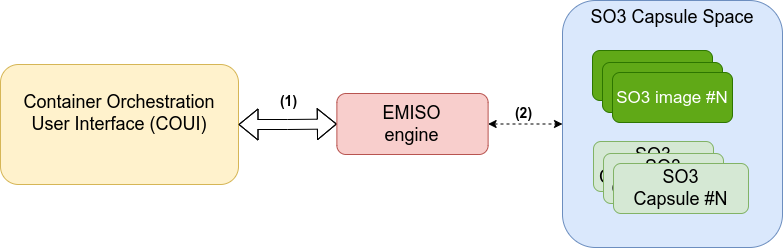
Fig. 4.1 Communication flow
Legends
The Portainer Server communicates directly with the EMISO Engine running on the Smart Object. The communication is done via HTTP or HTTPS/TLS using a RESTful API
EMISO Engine provides an interface to control the SO3 capsule.
The application can be called as following:
$ emiso_engine [-s] [-i]
Where
(optional)
-s: Start the webserver in secure mode (HTTPS/TLS)
Note
Due to some limitation with Portainer Server, the Secure mode is not supported
4.1. Service
A emiso systemd service exists to help control the engine on
systemd-based root file systems.
Note
The current MICOFE agency boots with SysVinit (busybox), so the
systemd unit is inert there. The engine is started instead by
/etc/init.d/S60emiso (rootfs overlay, board/common), after
S30soo (which creates /dev/soo/core) and S40network:
/etc/init.d/S60emiso {start|stop|restart}
Its output goes to /var/log/emiso.log rather than to the
multiplexed serial console. Options are taken from
/etc/default/emiso_engine (EMISO_ARGS). A rootfs built without
the agency user space simply skips the step.
Usage on a systemd rootfs:
Control
systemctl {start,stop,status,restart} emiso.service
Retrieve logs
journalctl -fu emiso.service
4.2. Architecture
The following picture depicts the architecture of the EMISO engine.
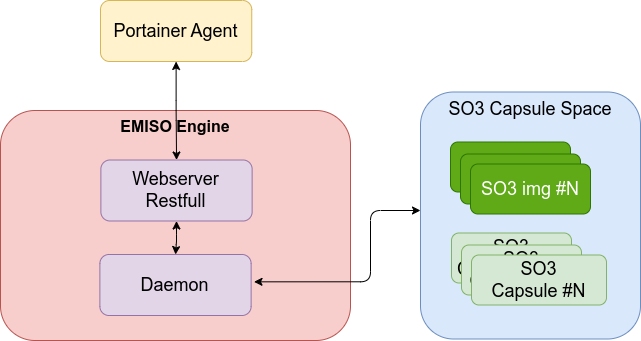
Fig. 4.2 Engine Architecture
The different blocks of the engine are:
A web server compliant with a subset of the Docker APIs.
EMISO Daemon handles the interactions with the SO3 Capsules
4.3. Daemon
The EMISO engine Daemon provides an interface to interact with the SO3
capsules (S3C — the concept formerly called Mobile Entity). The capsules are
controlled by the daemon through the SOO core driver (/dev/soo/core), the
same interface used by the s3c-* command line tools.
The following table provides the mapping between the Docker and SO3 elements. The Docker elements which are not present in the table - like volumes, networks, … - are not handled by the SO3 containers.
Docker
SO3 container
Dockerfile
SO3 capsule sources
Image
SO3 itb file
Capsule
SO3 “injected” container
The EMISO Engine daemon provides supports the following features:
Retrieving status/info about the SO3 Images/Containers
SO3 Capsule deployment/injection/creation
SO3 Capsule start/stop/restart
SO3 Capsule pause/unpause
SO3 Capsule termination / kill
4.3.1. SO3 Images
An SO3 capsule image consists in a SO3 “itb” file. These images are stored in
the /mnt/capsules/image/ folder of the agency (populated by
deploy.sh bsp-capsules, see Build system).
4.3.2. SO3 Capsule - Creation
Creating an SO3 Capsule only registers it: the image is checked for existence
and the capsule is recorded in the created state. Nothing is injected, and
no memory slot is held until the capsule is started.
A capsule is deliberately not created by injecting it and taking a snapshot.
AVZ fills the vcpu of a domain – VBAR_EL1, SCTLR_EL1 and the
translation table registers – when it schedules that domain out, so a capsule
which has never run carries zeros there. Restoring such a snapshot yields a
domain with neither vector table nor MMU setup, which faults on its first
exception and gets killed.
4.3.3. SO3 Capsule - Start
Starting a SO3 container injects its image and starts the capsule, whether it
comes from the created or the exited state. Only a paused capsule is
resumed from a snapshot, through unpause.
4.3.4. SO3 Capsule - Stop
In Docker, the container stop command consists in sending the SIGTERM, and
after a grace period, SIGKILL. It is a “gentle” container kill procedure. Once
a container has been stopped, it is possible to restart the container by calling
the “start” command.
To provide the same behaviors, the SO3 capsule stop command shutdown it. The capsule is then ready to be started!
4.3.5. SO3 Capsule – Pause / Unpause
Pausing an SO3 capsule creates a snapshot of its current state and then shuts it down. Unpausing restores the capsule by reading and injecting the snapshot.
4.3.6. SO3 Container - Logs
SO3 Capsules have to provide a method to retrieve their logs through Docker APIs. This improvement involves the VLOGS backend/frontend driver. When a log message is called from a SO3 Capsule (available in SO3 kernel and usr-space), the message is sent to the Linux kernel via the VLOGS backend/frontend drives.
The logged messages are stored in dedicated log files. Each capsule has its own file. The file path for these logs is as follows:
File path:
/var/log/soo/s3c_<slotID>.log
The following image shows an overview of this log’s mechanism.
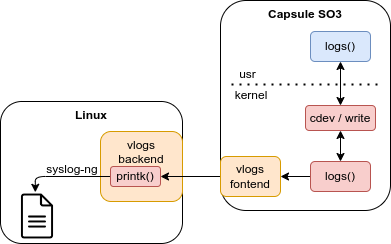
Fig. 4.3 EMISO engine logs flow
The behaviors is implemented this way:
* SO3 Capsule: The logs function has been added to SO3 containers. This
function adds [S3C:<SLOT ID>] prefix to the messages.
* linux: syslog-ng has been configured to store the messages with this prefix
in the logs files.
Note
All the s3c_<slotID>.log files are deleted at boot time
4.4. Quick validation
The engine listens on port 2375 (the standard Docker daemon port), on all
interfaces. Under QEMU it is reached from the host PC through the port forward
set up by st.sh — see Reaching an EMISO engine running in QEMU.
The whole container lifecycle can be exercised from the agency shell with the
busybox wget (the engine is already running, started by S60emiso):
cat /var/log/emiso.log                            # -> Server started on port 2375

# Docker-compatible discovery (what Portainer probes)
wget -q -O - http://127.0.0.1:2375/_ping          # -> OK
wget -q -O - http://127.0.0.1:2375/version        # -> ApiVersion 1.43, engine 1.0
wget -q -O - http://127.0.0.1:2375/images/json    # -> lists virt64_capsule.itb

# Container lifecycle (create = register, start = inject)
wget -q -O - --post-data='{"Image":"virt64_capsule"}' \
    "http://127.0.0.1:2375/containers/create?name=demo1"   # -> {"Id": "0"}
wget -q -O - --post-data= http://127.0.0.1:2375/containers/0/start
wget -q -O - http://127.0.0.1:2375/containers/json         # -> State "running"
s3c-list then reports the capsule as S3C_state_living, and its console
shows up on the multiplexed agency serial console.
Note
Container Ids start at 0, and a created (not started) container does
not appear in /containers/json: it holds no capsule slot yet.
Note
A snapshot is streamed to and from AVZ through a 4 MB bounce buffer,
reserved once when the soo module initialises. Neither pause nor unpause
needs a contiguous allocation the size of a capsule slot any more, so the
CMA pool of the agency guest (linux,cma in virt64_guest.dts) is no
longer a constraint on the snapshot path.